Computer Installation Notes
| Site: | Masomo Bora Kwa Wote |
| Course: | Masomo Bora Kwa Wote |
| Book: | Computer Installation Notes |
| Printed by: | |
| Date: | Saturday, 23 May 2026, 7:01 AM |
1. Algorithm Concept
The term algorithm was derived from the name of the 9th century Persian
mathematician and astronomer Mohammed al-Khwarizmi. The concept has been
adapted in computer science to refer to a step-by-step procedure that specifies how
to perform a task or solve a problem. Therefore, a computer program is an algorithm
implemented using a programming language.
To ensure that an algorithm produces desired solution, a programmer is tasked with
the following roles:
1. Identify a problem that may be solved using a computer program.
2. Outline the social and technological factors that need to be considered before
converting the problem into a computer program.
3. Provide possible solutions to a problem. This may be by means of using off-theshelf software or custom-made software.
1.1. Characteristics of Algorithm
A good algorithm is crucial to development of good computer programs. Some of
the characteristics of good algorithms include:
• Correctness: The goal during program design is to produce logical designs.
The design of a system is correct if the system satisfies user’s requirements. It
is the responsibility of a programmer to find the best possible design within the
limitations imposed by the requirements and environment in which the program
will be used.
• Verifiability: Verifiability is concerned with how easily the correctness of the
design can be checked. Design should be correct and it should be verified for
correctness.
• Completeness: Completeness requires that designs of different system
components be verified. This requires dry-running of system’s data structures,
modules, user interfaces, and module integration.
• Traceability: In order for a program to meet user’ needs and expectations, it is
important that the entire design be traceable from user requirements.
• Efficiency: Good design results in an efficient program that consumes less
processor time and memory space.
• Simplicity: Though a program may be complex, its simplicity is one of the most
important factors that influence its user-friendliness and ease of maintenance.
• Documentation: It is good practice to provide documentation containing details of a program algorithms.
1.2. Natural Language Algorithm
Consider a daily routine of waking up and going to class. Outline an algorithm
named “wakeup-to-class” starting with getting out of bed to attending the first
lesson of the day. If the routine is to be computerized, specify the order in which
statements are to be executed.
2. In groups, identify ingredients of preparing ibihaza or bugali. If the routine is to
be computerized, specifying the order in which statements are to be executed.
Discuss desirable qualities of recipe in terms of procedure for preparing the
product.
3. Consider a payroll program used to computer employee’s salary based on basic
salary, house allowance, commuter and overtime allowance. The basic salary is
based on eight hours per pay for five days a week. If monthly net salary is less
15% pay as you earn (PAYE) and 2.5% medical cover, perform the following
tasks:
• Using natural language such as English, develop an algorithm for a program
that calculates gross salary, net and total deductions.
2. Role and Structure of algorithms
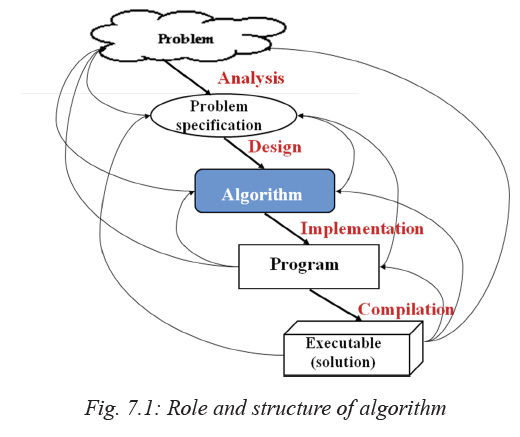
The role of algorithms is to support programmers in designing and implementing computer programs that solve a problem of importance. For example, consider a problem of finding the shortest route to travel between Kigali and Musanze. To solve such a problem, algorithm design follows a structured approach outlined below:
1. The programmer first analyses the problem to come up with problem specification as shown in Fig. 7.1. A problem specification defines input, processing and output required to solve the problem
2. Map the problem specification into an algorithm that defines the logic or
procedure for solving the problem.
3. Once an algorithm has been designed and tested against problem specifications,
implement it as a program using suitable programming languages.
4. Finally the program is installed on computers or portable devices to solve the
problem.
7.2 Design of Algorithms
Algorithms can be expressed in many ways such as using natural languages,
pseudocode, and flowcharts used for complex or technical algorithms. To avoid
ambiguities common in natural language statements, most programmers prefer using
structured design tools like pseudocode and flowcharts discussed in details later.
7.2.1 Natural language
The term natural language refers to the ordinary language likes English or Kinyarwanda
used by human beings to communicate with each other in speech or writing. Because
an algorithm is a procedure for solving a problem, the natural languages can be used
to express the steps to be followed to solve a specific problem. For example, the
following is natural language algorithm for how to make a hot sauce:
1. Before you prepare a hot sauce, make sure you have garlic that is peeled and
chopped, fresh lime juice, distilled white, vinegar, olive oil, molasses, turmeric
and salt.
2. Now, combine the pepper, garlic, lime juice, vinegar, mustard, oil, molasses,
turmeric, and salt in a blender and puree until smooth. Correct the seasoning,
adding more salt or molasses to taste.
3. Transfer the sauce to a clean bottle. You can serve it right away, but the flavour
improves if you let it age for a few days.
The above ‘algorithm’ is a recipe, that is, a step-by-step instructions that takes raw
ingredients and produces a tasty product – hot sauce. However, one of the limitations
of such an algorithm is that it tends to be verbose or ambiguous. Furthermore, there
are different languages in the world which makes it difficult for an algorithm written
in a particular language to be universal. To avoid ambiguities inherent in natural
languages, there are language independent tools such as pseudocode and flowcharts discussed later in this section.
3. Algorithms and Data structures
3.1. Pseudocode
Pseudocode is a standard method of describing an algorithm without use of any
specific programming language. The word pseudo means that although pseudocode
statements resemble real program code, it cannot be executed by a computer. The
purpose of pseudocode design is to help the programmers formulate their thoughts on
the organisation and sequence of a computer algorithm without the need of following
the actual coding syntax.
Although pseudocode is frequently used, there are no standard for its implementation.
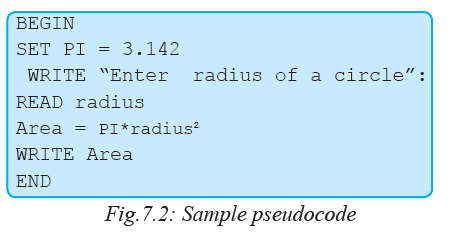
In most cases, we borrow keywords such as PRINT, WRITE, INPUT, and READ
from programming languages like FORTRAN and Pascal to express an algorithm as
a pseudocode. For example, Fig. 7.2 depicts pseudocode that takes radius as input
to calculate and display area of a circle:
To avoid ambiguity experienced with the use of natural languages, the following are
basic rules to be followed when writing pseudocode:
1. Pseudocode statements should be short, clear and readable.
2. The statements must not have more than one meaning i.e. should be unambiguous.
3. The pseudocode lines should be clearly outlined and identified clearly.
4. A pseudocode should show clearly the start and stop of executable statements
5. Input, output and processing statements should be clearly stated, using keywords
such as PRINT, READ, INPUT etc.
3.2. Flowchart
A flowchart is a diagrammatic or symbolic representation of step-by-step solution to a given problem. Flowcharts use standard symbols that help programmers visualize input, processing and output operations to be performed by a computer program. Unlike natural languages and pseudocode, use of standardised symbols makes the flowcharts easier to interpret hence more universally acceptable. Table 7.1 below gives a brief description of six standard symbols used to create flowcharts.
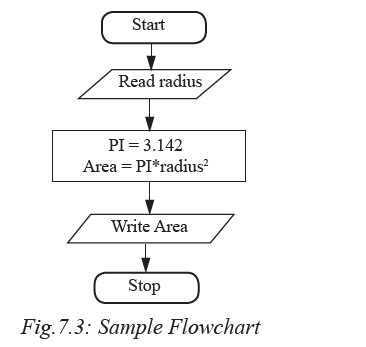
The example shown in Fig. 7.3 depicts a flowchart that takes radius as input
to calculate and display area of a circle.
Explanation
1. The first symbol indicates start of the flowchart.
2. The parallelogram (second symbol) indicates the algorithm takes radius as input.
3. The rectangle indicates that:
(i) Pi is assigned constant 3.142
(ii) The area is calculated as Pi × radius2
4. The fourth box display Area as output
5. The last symbol is the exit.
The following are general rules that may be followed when expressing an algorithm
using flowchart:
1. Be sure to use the right symbol for the right purpose. For examples it is wrong
to use a terminal symbol for input.
2. All the symbols of a flowchart should be connected using arrows (flow lines)
and not plain lines.
3. The direction of flow should be from top to bottom, or sides depending on the
page layout.
4. The start and end of a flowchart must be indicated with (start/stop) terminal
symbol.
5. Flowchart should have only one entry point at the top and one exit point at the
bottom or side.
6. The decision symbol should have only two exit points for either true or false
on the sides, or bottom and one side.
7. If a flowchart does not fit one page or column, use connectors to indicate breaks
in the flowchart
Advantages of using flowcharts
The following are some the advantages of using flowcharts to express an algorithm:
1. Flowcharts are better way of communicating the system logic.
2. With a flowchart, problem can be analysed in a more effective way.
3. Graphical representation of design serves as good program documentation.
4. Flowchart makes it easier to debug and maintain a program.
Activity 7.3: Expressing algorithm using flowcharts